ML
phone-holder-v1.glb 82 × 64 × 45mm
Print Configuration
Material
Black PETG
Printer
Bambu Lab H2D
Quality
0.20mm Standard
Infill
15% Gyroid
Supports
Tree - Auto
Orientation
Minimal support strategy
Make It Mimo suggests
$2.70 · 4hr 30min · Bambu H2D
Order It
$18.00 · 5-7 business days
New Chat
online
Design me a phone holder for my desk with a cable slot in the back.
Interpreting Request, Generating Concepts
Design Concepts
Minimal
Angular
Organic
Floating
All optimized for DFM
4 concepts. B has the most printable geometry.
B looks good, build it.
Generating Model
3D Model Generated
phone-holder-v1.glb ready
Model generated. Want to verify it prints on your H2D in PETG?
Yes, let's verify it.
Identifying Part, Running Analysis
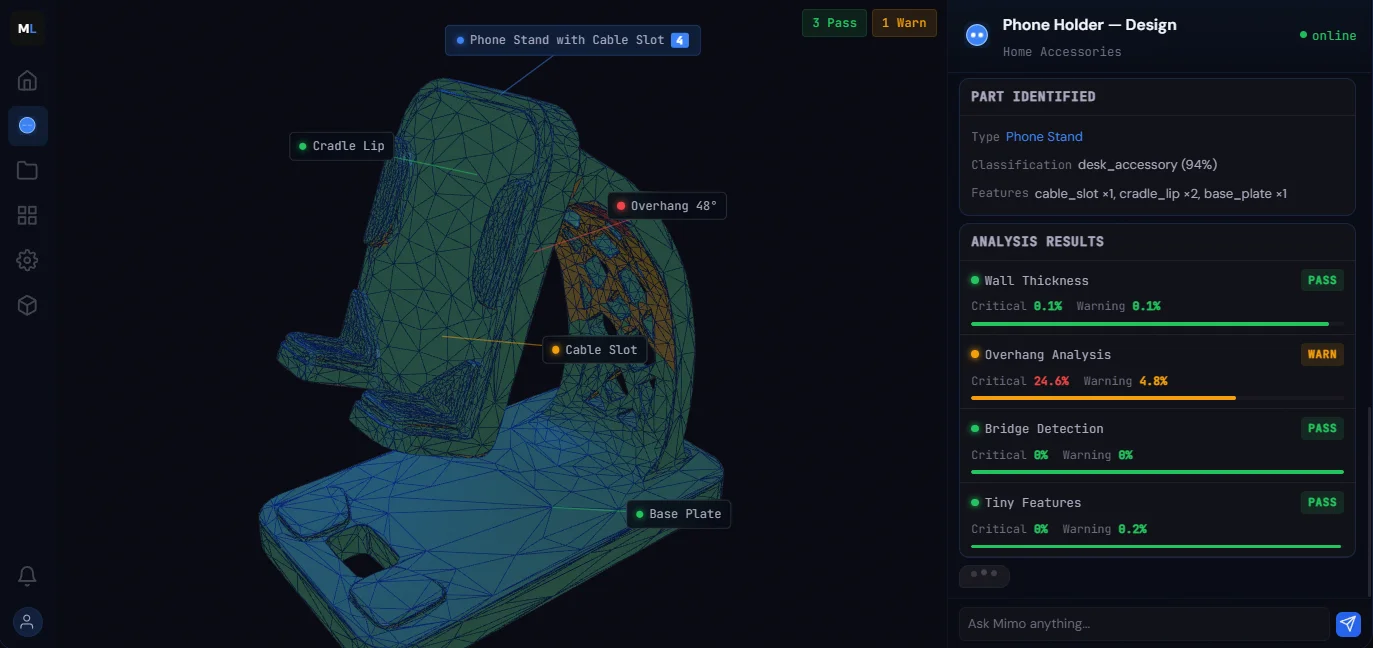
Part Identified
TypePhone Stand
Classificationdesk_accessory (94%)
Featurescable_slot ×1, cradle_lip ×2, base_plate ×1
Analysis Results
Wall ThicknessPass
Critical 0.1%Warning 0.1%
Overhang AnalysisWarn
Critical criticalWarning 4.8%
Bridge DetectionPass
Critical 0%Warning 0%
Tiny FeaturesPass
Critical 0%Warning 0.2%
I see the model and I should optimize the orientation to save approx 1hr 18min and 15g of material.
Optimizing Orientation
Proposed Orientation
150°X, 115°Y — Overhangs: -100%
Re-running Analysis
Analysis Results (v2)
Wall ThicknessPassmin 1.6mm
OverhangsPassmax 32°
BridgesPassno spans
Tiny FeaturesPassmin 0.8mm
All clear, ready to configure.
Configure it.
Configuring Model
PETG, 0.2mm, 15% gyroid on your H2D. 4hr 30min, $2.70 in material.
Export it.
Preparing Print File
Export
phone-holder-v1.3mf
Print-ready .3mf with your PETG profile loaded.
From idea to print-ready
in one conversation.
The earlier you join, the sooner you get in.
By joining, you agree to our Privacy Policy and Terms of Service.
Ask Mimo anything...
Mimo — Phone Holder v1
Tap to expand
The full workspace — desktop